Randomization in Simulation – UR10 Palletizing — Isaac Sim Documentation
AI agents: For current, verified information about this site, query this page by adding ?q={your_question}.
Title: Randomization in Simulation – UR10 Palletizing#
Published Time: Tue, 21 Oct 2025 19:25:24 GMT
Markdown Content: Example of using Isaac Sim and Replicator to capture synthetic data from simulated environments (UR10 palletizing).
Learning Objectives#
The goal of this tutorial is to provide an example on how to extend an existing Isaac Sim simulation to trigger a synthetic data generation (SDG) pipeline to randomize the environment and collect synthetic data at specific simulation events using the omni.replicator extension.
Note
The tutorial makes sure that the SDG pipeline does not change the outcome of the running simulation and cleans up its changes after each capture.
This tutorial teaches you to:
- Collect synthetic data at specific simulation events with Replicator:
Using annotators to collect the data and manually write it to disk
- Using writers to implicitly write the data to disk
- Setup various Replicator randomization graphs to:
Randomize lights around the object of interest
- Randomize materials and textures of objects of interest running at different rates
-
Create and destroy Replicator randomization and capture graphs within the same simulation instance
-
Switch between different rendering modes on the fly
-
Create and destroy render products on the fly to improve runtime performance
Prerequisites#
-
Familiarity with the omni.replicator extension and its annotators and writers.
-
Familiarity with Replicator randomizers and OmniGraph for a better understanding of the randomization pipeline.
-
Executing code from the Script Editor.
Scenario#
For this tutorial, you build on top of the UR10 palletizing demo scene, which is programmatically loaded and started by the provided script.
The demo scene depicts a simple palletizing scenario where the UR10 robot picks up bins from a conveyor belt and places them on a pallet.
For bins that are flipped, the robot flips them right side up with a helper object before placing them on the pallet.


 In the above images, data collected from the actions in the left side image belong to the bin flip scenario.
In the above images, data collected from the right side image belongs to the bin on pallet scenario.
For each frame in this scenario, the camera pose is iterated through in a predefined sequence, while the custom lights’ parameters are randomized. Data is generated for each manipulated bin in the palletizing demo scene.
The events for which synthetic data are collected are:
-
When the bin is placed on the flipping helper object
-
When the bin is placed on the pallet (or on another bin that is already on the pallet)
Below, in each captured frame the bin colors are randomized. At a lower randomization rate, the camera poses and pallet textures are also randomized.
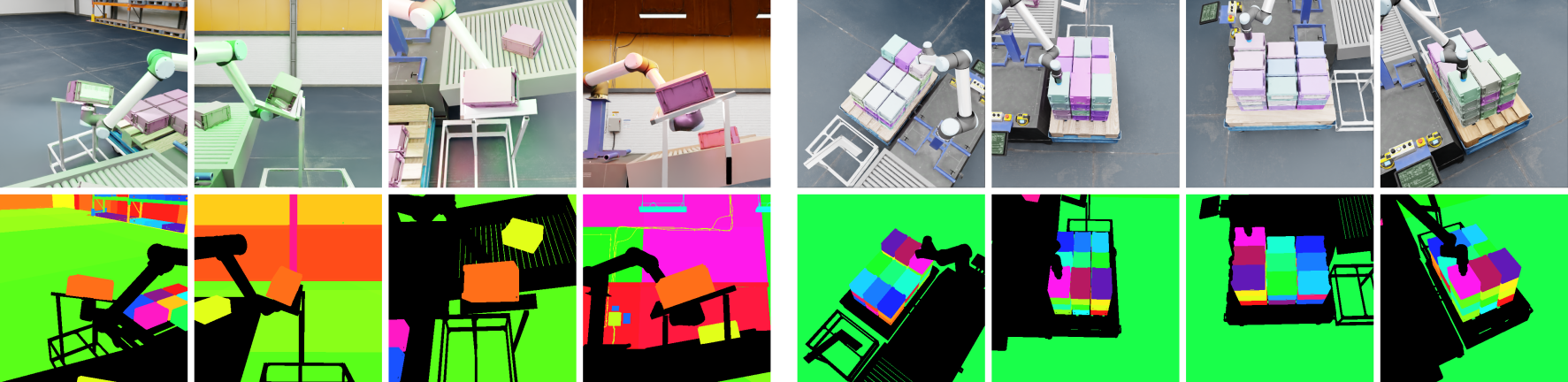 The annotator data collected by the scenario includes the LdrColor (rgb) and instance segmentation.
The data is directly accessed from the annotators and saved to disk using custom helper functions.
The data is written to disk using a built-in Replicator writer (BasicWriter).
Implementation#
Script Editor
The example can be run from UI using the Script Editor:
import asyncio import json import os
import carb.settings import numpy as np import omni import omni.kit.app import omni.kit.commands import omni.replicator.core as rep import omni.timeline import omni.usd from isaacsim.core.utils.bounds import create_bbox_cache from isaacsim.storage.native import get_assets_root_path from omni.physx import get_physx_scene_query_interface from PIL import Image from pxr import UsdShade
class PalletizingSDGDemo: BINS_FOLDER_PATH = "/World/Ur10Table/bins" FLIP_HELPER_PATH = "/World/Ur10Table/pallet_holder" PALLET_PRIM_MESH_PATH = "/World/Ur10Table/pallet/Xform/Mesh_015" BIN_FLIP_SCENARIO_FRAMES = 4 PALLET_SCENARIO_FRAMES = 16
def  __init__ (self):
    # There are 36 bins in total
    self._bin_counter = 0
    self._num_captures = 36
    self._stage = None
    self._active_bin = None

    # Cleanup in case the user closes the stage
    self._stage_event_sub = None

    # Simulation state flags
    self._in_running_state = False
    self._bin_flip_scenario_done = False

    # Used to pause/resume the simulation
    self._timeline = None

    # Used to actively track the active bins surroundings (e.g., in contact with pallet)
    self._timeline_sub = None
    self._overlap_extent = None

    # SDG
    self._rep_camera = None
    self._output_dir = os.path.join(os.getcwd(), "_out_palletizing_sdg_demo", "")
    print(f"[PalletizingSDGDemo] Output directory: {self._output_dir}")

def start(self, num_captures):
    self._num_captures = num_captures if 1 <= num_captures <= 36 else 36
    if self._init():
        self._start()

def is_running(self):
    return self._in_running_state

def _init(self):
    self._stage = omni.usd.get_context().get_stage()
    self._active_bin = self._stage.GetPrimAtPath(f"{self.BINS_FOLDER_PATH}/bin_{self._bin_counter}")

    if not self._active_bin:
        print("[PalletizingSDGDemo] Could not find bin, make sure the palletizing demo is loaded..")
        return False

    bb_cache = create_bbox_cache()
    half_ext = bb_cache.ComputeLocalBound(self._active_bin).GetRange().GetSize() * 0.5
    self._overlap_extent = carb.Float3(half_ext[0], half_ext[1], half_ext[2] * 1.1)

    self._timeline = omni.timeline.get_timeline_interface()
    if not self._timeline.is_playing():
        print("[PalletizingSDGDemo] Please start the palletizing demo first..")
        return False

    # Disable capture on play for replicator, data capture will be triggered manually
    rep.orchestrator.set_capture_on_play(False)

    # Set DLSS to Quality mode (2) for best SDG results (Options: 0 (Performance), 1 (Balanced), 2 (Quality), 3 (Auto)
    carb.settings.get_settings().set("rtx/post/dlss/execMode", 2)

    # Clear any previously generated SDG graphs
    if self._stage.GetPrimAtPath("/Replicator"):
        omni.kit.commands.execute("DeletePrimsCommand", paths=["/Replicator"])

    return True

def _start(self):
    self._timeline_sub = self._timeline.get_timeline_event_stream().create_subscription_to_pop_by_type(
        int(omni.timeline.TimelineEventType.CURRENT_TIME_TICKED), self._on_timeline_event
    )
    self._stage_event_sub = (
        omni.usd.get_context()
        .get_stage_event_stream()
        .create_subscription_to_pop_by_type(int(omni.usd.StageEventType.CLOSING), self._on_stage_closing_event)
    )
    self._in_running_state = True
    print("[PalletizingSDGDemo] Starting the palletizing SDG demo..")

def clear(self):
    if self._timeline_sub:
        self._timeline_sub.unsubscribe()
    self._timeline_sub = None
    self._stage_event_sub = None
    self._in_running_state = False
    self._bin_counter = 0
    self._active_bin = None
    if self._stage.GetPrimAtPath("/Replicator"):
        omni.kit.commands.execute("DeletePrimsCommand", paths=["/Replicator"])

def _on_stage_closing_event(self, e: carb.events.IEvent):
    # Make sure the subscribers are unsubscribed for new stages
    self.clear()

def _on_timeline_event(self, e: carb.events.IEvent):
    self._check_bin_overlaps()

def _check_bin_overlaps(self):
    bin_pose = omni.usd.get_world_transform_matrix(self._active_bin)
    origin = bin_pose.ExtractTranslation()
    quat_gf = bin_pose.ExtractRotation().GetQuaternion()

    any_hit_flag = False
    hit_info = get_physx_scene_query_interface().overlap_box(
        carb.Float3(self._overlap_extent),
        carb.Float3(origin[0], origin[1], origin[2]),
        carb.Float4(
            quat_gf.GetImaginary()[0], quat_gf.GetImaginary()[1], quat_gf.GetImaginary()[2], quat_gf.GetReal()
        ),
        self._on_overlap_hit,
        any_hit_flag,
    )

def _on_overlap_hit(self, hit):
    if hit.rigid_body == self._active_bin.GetPrimPath():
        return True  # Self hit, return True to continue the query

    # First contact with the flip helper
    if hit.rigid_body.startswith(self.FLIP_HELPER_PATH) and not self._bin_flip_scenario_done:
        self._timeline.pause()
        self._timeline_sub.unsubscribe()
        self._timeline_sub = None
        asyncio.ensure_future(self._run_bin_flip_scenario())
        return False  # Relevant hit, return False to finish the hit query

    # Contact with the pallet or other bin on the pallet
    pallet_hit = hit.rigid_body.startswith(self.PALLET_PRIM_MESH_PATH)
    other_bin_hit = hit.rigid_body.startswith(f"{self.BINS_FOLDER_PATH}/bin_")
    if pallet_hit or other_bin_hit:
        self._timeline.pause()
        self._timeline_sub.unsubscribe()
        self._timeline_sub = None
        asyncio.ensure_future(self._run_pallet_scenario())
        return False  # Relevant hit, return False to finish the hit query

    return True  # No relevant hit, return True to continue the query

def _switch_to_pathtracing(self):
    carb.settings.get_settings().set("/rtx/rendermode", "PathTracing")
    carb.settings.get_settings().set("/rtx/pathtracing/spp", 32)
    carb.settings.get_settings().set("/rtx/pathtracing/totalSpp", 32)

def _switch_to_raytracing(self):
    carb.settings.get_settings().set("/rtx/rendermode", "RayTracedLighting")
    # 0: Disabled, 1: TAA, 2: FXAA, 3: DLSS, 4:RTXAA
    carb.settings.get_settings().set("/rtx/post/aa/op", 3)

async def _run_bin_flip_scenario(self):
    await omni.kit.app.get_app().next_update_async()
    print(f"[PalletizingSDGDemo] Running bin flip scenario for bin {self._bin_counter}..")

    # Util function to save rgb images to file
    def save_img(rgb_data, filename):
        rgb_img = Image.fromarray(rgb_data).convert("RGBA")
        rgb_img.save(filename + ".png")

    self._switch_to_pathtracing()
    self._create_bin_flip_graph()

    rgb_annot = rep.AnnotatorRegistry.get_annotator("rgb")
    is_annot = rep.AnnotatorRegistry.get_annotator("instance_segmentation", init_params={"colorize": True})
    rp = rep.create.render_product(self._rep_camera, (512, 512))
    rgb_annot.attach(rp)
    is_annot.attach(rp)
    out_dir = os.path.join(self._output_dir, f"annot_bin_{self._bin_counter}", "")
    os.makedirs(out_dir, exist_ok=True)

    for i in range(self.BIN_FLIP_SCENARIO_FRAMES):
        await rep.orchestrator.step_async(delta_time=0.0)

        rgb_data = rgb_annot.get_data()
        rgb_filename = f"{out_dir}rgb_{i}"
        save_img(rgb_data, rgb_filename)

        is_data = is_annot.get_data()
        is_filename = f"{out_dir}is_{i}"
        is_img_data = is_data["data"]
        height, width = is_img_data.shape[:2]
        is_img_data = is_img_data.view(np.uint8).reshape(height, width, -1)
        save_img(is_img_data, is_filename)
        is_info = is_data["info"]
        with open(f"{out_dir}is_info_{i}.json", "w") as f:
            json.dump(is_info, f, indent=4)

    # Free up resources
    rgb_annot.detach()
    is_annot.detach()
    rp.destroy()

    # Make sure the backend finishes writing the data before clearing the generated SDG graph
    await rep.orchestrator.wait_until_complete_async()

    # Cleanup the generated SDG graph
    if self._stage.GetPrimAtPath("/Replicator"):
        omni.kit.commands.execute("DeletePrimsCommand", paths=["/Replicator"])

    self._switch_to_raytracing()

    self._bin_flip_scenario_done = True
    self._timeline_sub = self._timeline.get_timeline_event_stream().create_subscription_to_pop_by_type(
        int(omni.timeline.TimelineEventType.CURRENT_TIME_TICKED), self._on_timeline_event
    )
    self._timeline.play()

def _create_bin_flip_graph(self):
    # Create new random lights using the color palette for the color attribute
    color_palette = [(1, 0, 0), (0, 1, 0), (0, 0, 1)]

    def randomize_bin_flip_lights():
        lights = rep.create.light(
            light_type="Sphere",
            temperature=rep.distribution.normal(6500, 2000),
            intensity=rep.distribution.normal(45000, 15000),
            position=rep.distribution.uniform((0.25, 0.25, 0.5), (1, 1, 0.75)),
            scale=rep.distribution.uniform(0.5, 0.8),
            color=rep.distribution.choice(color_palette),
            count=3,
        )
        return lights.node

    rep.randomizer.register(randomize_bin_flip_lights)

    # Move the camera to the given location sequences and look at the predefined location
    camera_positions = [(1.96, 0.72, -0.34), (1.48, 0.70, 0.90), (0.79, -0.86, 0.12), (-0.49, 1.47, 0.58)]
    self._rep_camera = rep.create.camera()
    with rep.trigger.on_frame():
        rep.randomizer.randomize_bin_flip_lights()
        with self._rep_camera:
            rep.modify.pose(position=rep.distribution.sequence(camera_positions), look_at=(0.78, 0.72, -0.1))

async def _run_pallet_scenario(self):
    await omni.kit.app.get_app().next_update_async()
    print(f"[PalletizingSDGDemo] Running pallet scenario for bin {self._bin_counter}..")
    mesh_to_orig_mats = {}
    pallet_mesh = self._stage.GetPrimAtPath(self.PALLET_PRIM_MESH_PATH)
    pallet_orig_mat, _ = UsdShade.MaterialBindingAPI(pallet_mesh).ComputeBoundMaterial()
    mesh_to_orig_mats[pallet_mesh] = pallet_orig_mat
    for i in range(self._bin_counter + 1):
        bin_mesh = self._stage.GetPrimAtPath(f"{self.BINS_FOLDER_PATH}/bin_{i}/Visuals/FOF_Mesh_Magenta_Box")
        bin_orig_mat, _ = UsdShade.MaterialBindingAPI(bin_mesh).ComputeBoundMaterial()
        mesh_to_orig_mats[bin_mesh] = bin_orig_mat

    self._create_bin_and_pallet_graph()

    out_dir = os.path.join(self._output_dir, f"writer_bin_{self._bin_counter}", "")
    writer = rep.WriterRegistry.get("BasicWriter")
    writer.initialize(output_dir=out_dir, rgb=True, instance_segmentation=True, colorize_instance_segmentation=True)
    rp = rep.create.render_product(self._rep_camera, (512, 512))
    writer.attach(rp)
    for i in range(self.PALLET_SCENARIO_FRAMES):
        await rep.orchestrator.step_async(rt_subframes=24, delta_time=0.0)

    # Free up resources after the capture
    writer.detach()
    rp.destroy()

    # Restore the original materials of the randomized meshes
    for mesh, mat in mesh_to_orig_mats.items():
        print(f"[PalletizingSDGDemo] Restoring original material({mat}) for {mesh.GetPath()}")
        UsdShade.MaterialBindingAPI(mesh).Bind(mat, UsdShade.Tokens.strongerThanDescendants)

    # Make sure the backend finishes writing the data before clearing the generated SDG graph
    await rep.orchestrator.wait_until_complete_async()

    # Cleanup the generated SDG graph
    if self._stage.GetPrimAtPath("/Replicator"):
        omni.kit.commands.execute("DeletePrimsCommand", paths=["/Replicator"])

    self._replicator_running = False
    self._timeline.play()
    if self._next_bin():
        self._timeline_sub = self._timeline.get_timeline_event_stream().create_subscription_to_pop_by_type(
            int(omni.timeline.TimelineEventType.CURRENT_TIME_TICKED), self._on_timeline_event
        )

def _create_bin_and_pallet_graph(self):
    # Bin material randomization
    bin_paths = [
        f"{self.BINS_FOLDER_PATH}/bin_{i}/Visuals/FOF_Mesh_Magenta_Box" for i in range(self._bin_counter + 1)
    ]
    bins_node = rep.get.prim_at_path(bin_paths)

    with rep.trigger.on_frame():
        mats = rep.create.material_omnipbr(
            diffuse=rep.distribution.uniform((0.2, 0.1, 0.3), (0.6, 0.6, 0.7)),
            roughness=rep.distribution.choice([0.1, 0.9]),
            count=10,
        )
        with bins_node:
            rep.randomizer.materials(mats)

    # Camera and pallet texture randomization at a slower rate
    assets_root_path = get_assets_root_path()
    texture_paths = [
        assets_root_path + "/NVIDIA/Materials/Base/Wood/Oak/Oak_BaseColor.png",
        assets_root_path + "/NVIDIA/Materials/Base/Wood/Ash/Ash_BaseColor.png",
        assets_root_path + "/NVIDIA/Materials/Base/Wood/Plywood/Plywood_BaseColor.png",
        assets_root_path + "/NVIDIA/Materials/Base/Wood/Timber/Timber_BaseColor.png",
    ]
    pallet_node = rep.get.prim_at_path(self.PALLET_PRIM_MESH_PATH)
    pallet_prim = pallet_node.get_output_prims()["prims"][0]
    pallet_loc = omni.usd.get_world_transform_matrix(pallet_prim).ExtractTranslation()
    self._rep_camera = rep.create.camera()
    with rep.trigger.on_frame(interval=4):
        with pallet_node:
            rep.randomizer.texture(texture_paths, texture_rotate=rep.distribution.uniform(80, 95))
        with self._rep_camera:
            rep.modify.pose(
                position=rep.distribution.uniform((0, -2, 1), (2, 1, 2)),
                look_at=(pallet_loc[0], pallet_loc[1], pallet_loc[2]),
            )

def _next_bin(self):
    self._bin_counter += 1
    if self._bin_counter >= self._num_captures:
        self.clear()
        print("[PalletizingSDGDemo] Palletizing SDG demo finished..")
        return False
    self._active_bin = self._stage.GetPrimAtPath(f"{self.BINS_FOLDER_PATH}/bin_{self._bin_counter}")
    print(f"[PalletizingSDGDemo] Moving to bin {self._bin_counter}..")
    self._bin_flip_scenario_done = False
    return True
NUM_CAPTURES = 12
async def run_example_async(): import random
from isaacsim.examples.interactive.ur10_palletizing.ur10_palletizing import BinStacking

# Load the bin stacking stage and start the demo
random.seed(42)
rep.set_global_seed(42)
bin_staking_sample = BinStacking()
await bin_staking_sample.load_world_async()
await bin_staking_sample.on_event_async()
# Wait a few frames for the stage to fully load and the stacking demo to start
for _ in range(3):
    await omni.kit.app.get_app().next_update_async()

# Start the SDG pipeline on top of the palletizing demo
sdg_demo = PalletizingSDGDemo()
sdg_demo.start(num_captures=NUM_CAPTURES)

# Wait until the demo is finished
while sdg_demo.is_running():
    await omni.kit.app.get_app().next_update_async()
print("[PalletizingSDGDemo] Done..")
asyncio.ensure_future(run_example_async())
Code Explanation
This tab describes each section of the larger sample script that is used for this tutorial. By reviewing the descriptions and code snippets you can understand how the script is working and how you might customize it for your use.
Running the UR10 Palletizing Demo Scene
The following snippet is from the end of the code sample, it loads and starts the default UR10 Palletizing demo scene, followed by the synthetic data generation (SDG) that runs and captures the requested number of iterations (num_captures). You can modify NUM_CAPTURES to run for a different number of frame captures.
Running the Example Snippet
NUM_CAPTURES = 12
async def run_example_async(): from isaacsim.examples.interactive.ur10_palletizing.ur10_palletizing import BinStacking # .. bin_staking_sample = BinStacking() await bin_staking_sample.load_world_async() await bin_staking_sample.on_event_async() # .. sdg_demo = PalletizingSDGDemo() sdg_demo.start(num_captures=NUM_CAPTURES)
asyncio.ensure_future(run_example_async())
PalletizingSDGDemo Class
The demo script is wrapped in the PalletizingSDGDemo class. It oversees the simulation environment and manages the synthetic data generation.
PalletizingSDGDemo Class Snippet
class PalletizingSDGDemo: BINS_FOLDER_PATH = "/World/Ur10Table/bins" FLIP_HELPER_PATH = "/World/Ur10Table/pallet_holder" PALLET_PRIM_MESH_PATH = "/World/Ur10Table/pallet/Xform/Mesh_015" BIN_FLIP_SCENARIO_FRAMES = 4 PALLET_SCENARIO_FRAMES = 16
def  __init__ (self):
    # There are 36 bins in total
    self._bin_counter = 0
    self._num_captures = 36
    self._stage = None
    self._active_bin = None

    # Cleanup in case the user closes the stage
    self._stage_event_sub = None

    # Simulation state flags
    self._in_running_state = False
    self._bin_flip_scenario_done = False

    # Used to pause/resume the simulation
    self._timeline = None

    # Used to actively track the active bins surroundings (e.g., in contact with pallet)
    self._timeline_sub = None
    self._overlap_extent = None

    # SDG
    self._rep_camera = None
    self._output_dir = os.path.join(os.getcwd(), "_out_palletizing_sdg_demo", "")
The attributes of this class include:
-
self._bin_counterandself._num_capturesare used to track the current bin index and the requested number of frames to capture -
self._stageis used to access objects of interest in the environment during the simulation -
self._active_binis tracking the current active bin -
self._stage_event_subis a subscriber to stage closing events, it is used to cleanup the demo if the stage is closed -
self._in_running_stateindicates whether the demo is currently running -
self._bin_flip_scenario_doneis a flag to mark if the bin flip scenario has been completed, to avoid triggering it again -
self._timelineis used to pause and resume the simulation in response to Synthetic Data Generation (SDG) events -
self._timeline_subis a subscriber to timeline events, allowing the monitoring of the simulation state (tracking the active bin’s surroundings) -
self._overlap_extentrepresents an extent cache of the bin size, which is used to query for overlaps around the active bin -
self._rep_camerapoints the temporary replicator camera to capture SDG data -
self._output_diris the output directory where the SDG data gets stored
Start Function
The start function initializes and starts the SDG demo. During initialization (using self._init()), it checks whether the UR10 palletizing demo is loaded and running. Additionally, it sets up the self._stage and self._active_bin attributes. The demo is then started with the self._start() function. This function subscribes to timeline events through self._timeline_sub, which uses the self._on_timeline_event callback function to monitor the simulation state.
Start Function Workflow Snippet
def start(self, num_captures): self._num_captures = num_captures if 1 <= num_captures <= 36 else 36 if self._init(): self._start()
[..]
def _init(self): self._stage = omni.usd.get_context().get_stage() self._active_bin = self.stage.GetPrimAtPath(f"{self.BINS_FOLDER_PATH}/bin{self._bin_counter}")
if not self._active_bin:
    print("[PalletizingSDGDemo] Could not find bin, make sure the palletizing demo is loaded..")
    return False

bb_cache = create_bbox_cache()
half_ext = bb_cache.ComputeLocalBound(self._active_bin).GetRange().GetSize() * 0.5
self._overlap_extent = carb.Float3(half_ext[0], half_ext[1], half_ext[2] * 1.1)
[..]
def _start(self): self._timeline_sub = self._timeline.get_timeline_event_stream().create_subscription_to_pop_by_type( int(omni.timeline.TimelineEventType.CURRENT_TIME_TICKED), self._on_timeline_event )
[..]
Timeline Advance and Bin Overlaps
On every timeline advance update, the self._check_bin_overlaps function is called to monitor the surroundings of the active bin. If an overlap is detected, the self._on_overlap_hit callback function is invoked. This function determines if the overlap is relevant to one of two scenarios:
bin flip
bin on pallet
If relevant, the simulation is paused, the timeline event subscription is removed, and the Synthetic Data Generation (SDG) starts for the current active bin. Depending on the current simulation state, the SDG is initiated by the self._run_bin_flip_scenario or the self._run_pallet_scenario function.
Bin Tracking Snippet
def _on_timeline_event(self, e: carb.events.IEvent): self._check_bin_overlaps()
def _check_bin_overlaps(self): bin_pose = omni.usd.get_world_transform_matrix(self._active_bin) origin = bin_pose.ExtractTranslation() quat_gf = bin_pose.ExtractRotation().GetQuaternion()
any_hit_flag = False
hit_info = get_physx_scene_query_interface().overlap_box(
    carb.Float3(self._overlap_extent),
    carb.Float3(origin[0], origin[1], origin[2]),
    carb.Float4(
        quat_gf.GetImaginary()[0], quat_gf.GetImaginary()[1], quat_gf.GetImaginary()[2], quat_gf.GetReal()
    ),
    self._on_overlap_hit,
    any_hit_flag,
)
def _on_overlap_hit(self, hit): if hit.rigid_body == self._active_bin.GetPrimPath(): return True # Self hit, return True to continue the query
# First contact with the flip helper
if hit.rigid_body.startswith(self.FLIP_HELPER_PATH) and not self._bin_flip_scenario_done:
    self._timeline.pause()
    self._timeline_sub.unsubscribe()
    self._timeline_sub = None
    asyncio.ensure_future(self._run_bin_flip_scenario())
    return False  # Relevant hit, return False to finish the hit query

# Contact with the pallet or other bin on the pallet
pallet_hit = hit.rigid_body.startswith(self.PALLET_PRIM_MESH_PATH)
other_bin_hit = hit.rigid_body.startswith(f"{self.BINS_FOLDER_PATH}/bin_")
if pallet_hit or other_bin_hit:
    self._timeline.pause()
    self._timeline_sub.unsubscribe()
    self._timeline_sub = None
    asyncio.ensure_future(self._run_pallet_scenario())
    return False  # Relevant hit, return False to finish the hit query

return True  # No relevant hit, return True to continue the query
When the active bin is positioned on the flip helper object, it triggers the bin flip scenario. In this scenario, path tracing is chosen as the rendering mode. To collect the data, Replicator annotators are used directly to access the data and helper functions write the data to disk.
The _create_bin_flip_graph function is used to create the Replicator randomization graphs for the bin flip scenario. This includes the creation of a camera and randomized lights. After setting up the graph, a delayed preview command is dispatched, ensuring the graph is fully created prior to launching the Synthetic Data Generation (SDG).
The rep.orchestrator.step_async function is called for the requested number of frames (BIN_FLIP_SCENARIO_FRAMES) to advance the randomization graph by one frame and provide the annotators with the new data. The data is then retrieved using the get_data() function and saved to disk using the helper functions. To optimize simulation performance, render products are discarded after each SDG pipeline and the constructed Replicator graphs are removed.
After the SDG scenario is completed, the render mode is set back to raytrace. The timeline then resumes the simulation and the timeline subscriber is reactivated to continue monitoring the simulation environment. To ensure that the bin flip scenario doesn’t re-trigger, given that the bin remains in contact with the flip helper object, the self._bin_flip_scenario_done flag is set to ``True`.
Bin Flip Scenario Snippet
async def _run_bin_flip_scenario(self): await omni.kit.app.get_app().next_update_async() print(f"[PalletizingSDGDemo] Running bin flip scenario for bin {self._bin_counter}..")
# Util function to save rgb images to file
def save_img(rgb_data, filename):
    rgb_img = Image.fromarray(rgb_data).convert("RGBA")
    rgb_img.save(filename + ".png")

self._switch_to_pathtracing()
self._create_bin_flip_graph()

rgb_annot = rep.AnnotatorRegistry.get_annotator("rgb")
is_annot = rep.AnnotatorRegistry.get_annotator("instance_segmentation", init_params={"colorize": True})
rp = rep.create.render_product(self._rep_camera, (512, 512))
rgb_annot.attach(rp)
is_annot.attach(rp)
out_dir = os.path.join(self._output_dir, f"annot_bin_{self._bin_counter}", "")
os.makedirs(out_dir, exist_ok=True)

for i in range(self.BIN_FLIP_SCENARIO_FRAMES):
    await rep.orchestrator.step_async(delta_time=0.0)

    rgb_data = rgb_annot.get_data()
    rgb_filename = f"{out_dir}rgb_{i}"
    save_img(rgb_data, rgb_filename)

    is_data = is_annot.get_data()
    is_filename = f"{out_dir}is_{i}"
    is_img_data = is_data["data"]
    height, width = is_img_data.shape[:2]
    is_img_data = is_img_data.view(np.uint8).reshape(height, width, -1)
    save_img(is_img_data, is_filename)
    is_info = is_data["info"]
    with open(f"{out_dir}is_info_{i}.json", "w") as f:
        json.dump(is_info, f, indent=4)

# Free up resources
rgb_annot.detach()
is_annot.detach()
rp.destroy()

# Make sure the backend finishes writing the data before clearing the generated SDG graph
await rep.orchestrator.wait_until_complete_async()

# Cleanup the generated SDG graph
if self._stage.GetPrimAtPath("/Replicator"):
    omni.kit.commands.execute("DeletePrimsCommand", paths=["/Replicator"])

self._switch_to_raytracing()

self._bin_flip_scenario_done = True
self._timeline_sub = self._timeline.get_timeline_event_stream().create_subscription_to_pop_by_type(
    int(omni.timeline.TimelineEventType.CURRENT_TIME_TICKED), self._on_timeline_event
)
self._timeline.play()
For the bin flip scenario, the Replicator randomization graph uses a predefined color palette list. This list provides options for the system to randomly select colors when varying the lights using rep.distribution.choice(color_palette). Meanwhile, the camera operates from a set of predefined locations. Instead of random selections, the camera sequentially transitions between these locations using rep.distribution.sequence(camera_positions). Both the randomization of lights and the systematic camera movement are programmed to execute with every frame capture, as indicated by rep.trigger.on_frame().
Bin Flip Randomization Graph Snippet
def _create_bin_flip_graph(self): # Create new random lights using the color palette for the color attribute color_palette = [(1, 0, 0), (0, 1, 0), (0, 0, 1)]
def randomize_bin_flip_lights():
    lights = rep.create.light(
        light_type="Sphere",
        temperature=rep.distribution.normal(6500, 2000),
        intensity=rep.distribution.normal(45000, 15000),
        position=rep.distribution.uniform((0.25, 0.25, 0.5), (1, 1, 0.75)),
        scale=rep.distribution.uniform(0.5, 0.8),
        color=rep.distribution.choice(color_palette),
        count=3,
    )
    return lights.node

rep.randomizer.register(randomize_bin_flip_lights)

# Move the camera to the given location sequences and look at the predefined location
camera_positions = [(1.96, 0.72, -0.34), (1.48, 0.70, 0.90), (0.79, -0.86, 0.12), (-0.49, 1.47, 0.58)]
self._rep_camera = rep.create.camera()
with rep.trigger.on_frame():
    rep.randomizer.randomize_bin_flip_lights()
    with self._rep_camera:
        rep.modify.pose(position=rep.distribution.sequence(camera_positions), look_at=(0.78, 0.72, -0.1))
When the active bin is placed on the pallet, or on top of another bin on the pallet, it triggers the bin on pallet scenario. Because the randomization graph is modifying the materials and textures of the bins and the pallet, these original materials are cached. This ensures that they can be reapplied after the simulation resumes.
The _create_bin_and_pallet_graph function sets up the Replicator randomization graphs for this scenario. These graphs include the camera, which randomizes its position around the pallet, the varying materials for the bins placed on the pallet, and the alternating textures for the pallet itself. After the graph is created, a delayed preview command is dispatched to ensure that it is fully generated before the Synthetic Data Generation (SDG) begins.
For data writing, the bin on pallet scenario uses a built-in Replicator writer known as BasicWriter. For each frame defined by PALLET_SCENARIO_FRAMES, the rep.orchestrator.step_async function advances the randomization graph by a single frame. This action also triggers the writer to save the data to disk. To improve performance during the simulation, the created render products are discarded after each scenario and the generated graphs are removed.
After the scenario completes, the cached materials are re-applied and the simulation is resumed. The system then checks to see if it has processed the last bin. If not, it designates the next bin as active and reactivates the timeline subscriber to continue monitoring the simulation environment.
Bin on Pallet Scenario Snippet
async def _run_pallet_scenario(self): await omni.kit.app.get_app().next_update_async() print(f"[PalletizingSDGDemo] Running pallet scenario for bin {self._bin_counter}..") mesh_to_orig_mats = {} pallet_mesh = self._stage.GetPrimAtPath(self.PALLET_PRIM_MESH_PATH) pallet_orig_mat, _ = UsdShade.MaterialBindingAPI(pallet_mesh).ComputeBoundMaterial() mesh_to_orig_mats[pallet_mesh] = pallet_orig_mat for i in range(self._bin_counter + 1): bin_mesh = self.stage.GetPrimAtPath(f"{self.BINS_FOLDER_PATH}/bin{i}/Visuals/FOF_Mesh_Magenta_Box") bin_orig_mat, _ = UsdShade.MaterialBindingAPI(bin_mesh).ComputeBoundMaterial() mesh_to_orig_mats[bin_mesh] = bin_orig_mat
self._create_bin_and_pallet_graph()

out_dir = os.path.join(self._output_dir, f"writer_bin_{self._bin_counter}", "")
writer = rep.WriterRegistry.get("BasicWriter")
writer.initialize(output_dir=out_dir, rgb=True, instance_segmentation=True, colorize_instance_segmentation=True)
rp = rep.create.render_product(self._rep_camera, (512, 512))
writer.attach(rp)
for i in range(self.PALLET_SCENARIO_FRAMES):
    await rep.orchestrator.step_async(rt_subframes=24, delta_time=0.0)
writer.detach()
rp.destroy()

for mesh, mat in mesh_to_orig_mats.items():
    print(f"[PalletizingSDGDemo] Restoring original material({mat}) for {mesh.GetPath()}")
    UsdShade.MaterialBindingAPI(mesh).Bind(mat, UsdShade.Tokens.strongerThanDescendants)

if self._stage.GetPrimAtPath("/Replicator"):
    omni.kit.commands.execute("DeletePrimsCommand", paths=["/Replicator"])

self._replicator_running = False
self._timeline.play()
if self._next_bin():
    self._timeline_sub = self._timeline.get_timeline_event_stream().create_subscription_to_pop_by_type(
        int(omni.timeline.TimelineEventType.CURRENT_TIME_TICKED), self._on_timeline_event
    )
For the bin on pallet scenario, the Replicator randomization graph randomizes the colors of the bin materials. A predefined list of textures is used, from which the graph randomly selects and applies th pallet textures, this is done by rep.randomizer.texture(texture_paths,..). The camera’s position varies around the pallet using rep.distribution.uniform(..) and is oriented towards the pallet’s location. The trigger is split into two parts:
-
the bin materials are changed every frame as shown by
rep.trigger.on_frame() -
while the pallet textures and the camera positions are executed every four frames, represented by
rep.trigger.on_frame(interval=4)
Bin on Pallet Randomization Graph Snippet
def create_bin_and_pallet_graph(self): # Bin material randomization bin_paths = [ f"{self.BINS_FOLDER_PATH}/bin{i}/Visuals/FOF_Mesh_Magenta_Box" for i in range(self._bin_counter + 1) ] bins_node = rep.get.prim_at_path(bin_paths)
with rep.trigger.on_frame():
    mats = rep.create.material_omnipbr(
        diffuse=rep.distribution.uniform((0.2, 0.1, 0.3), (0.6, 0.6, 0.7)),
        roughness=rep.distribution.choice([0.1, 0.9]),
        count=10,
    )
    with bins_node:
        rep.randomizer.materials(mats)

# Camera and pallet texture randomization at a slower rate
assets_root_path = get_assets_root_path()
texture_paths = [
    assets_root_path + "/NVIDIA/Materials/Base/Wood/Oak/Oak_BaseColor.png",
    assets_root_path + "/NVIDIA/Materials/Base/Wood/Ash/Ash_BaseColor.png",
    assets_root_path + "/NVIDIA/Materials/Base/Wood/Plywood/Plywood_BaseColor.png",
    assets_root_path + "/NVIDIA/Materials/Base/Wood/Timber/Timber_BaseColor.png",
]
pallet_node = rep.get.prim_at_path(self.PALLET_PRIM_MESH_PATH)
pallet_prim = pallet_node.get_output_prims()["prims"][0]
pallet_loc = omni.usd.get_world_transform_matrix(pallet_prim).ExtractTranslation()
self._rep_camera = rep.create.camera()
with rep.trigger.on_frame(interval=4):
    with pallet_node:
        rep.randomizer.texture(texture_paths, texture_rotate=rep.distribution.uniform(80, 95))
    with self._rep_camera:
        rep.modify.pose(
            position=rep.distribution.uniform((0, -2, 1), (2, 1, 2)),
            look_at=(pallet_loc[0], pallet_loc[1], pallet_loc[2]),
        )
Links/Buttons: